
Pay a Citation on myNCDPS
Once you have logged into myNCDPS, you can search for your property by following the steps below:
- Select Find & Pay Citations
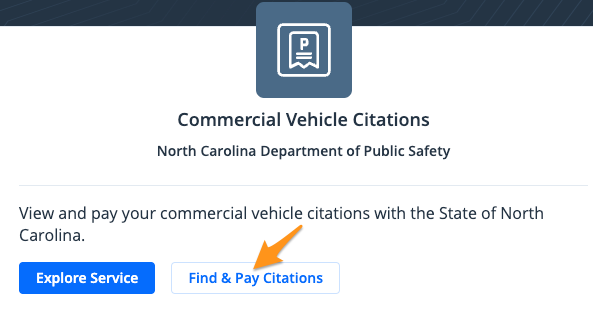
- Search by "License Plate #", "DOT #". "Control #", "Citation #", and "Name". Choose your response and enter the information for your citation. Then select Search.

-
Review your search results. If everything looks correct choose and/or confirm the citation you would like to pay. You can select No, search again if something doesn't look right.
-
If you are enrolled in a payment plan your Payment Plan information will be displayed with the option to choose Installment Balance or Payoff Balance
Note: "Payoff Balance" includes all interest and penalties to date and may be different than "Total Amount Due"
- Review your "Payment Summary". If everything looks correct click Add to cart,then select Go to Cart. Or to search and pay for an additional citation, select Add another citation.
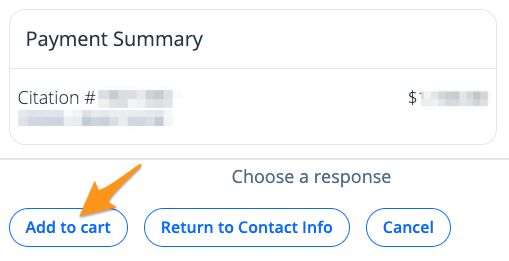
Note: If this is your first time submitting a payment on myNCDPS, you will be asked to submit "Contact Information" before adding the citation to your cart.
- Select Continue to Checkout
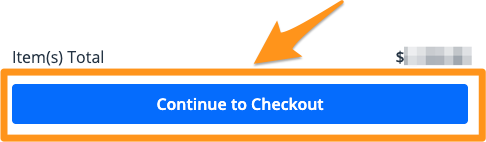
- Select a payment method or add a new payment method. Then click the blue Pay $--.--button to complete your payment.
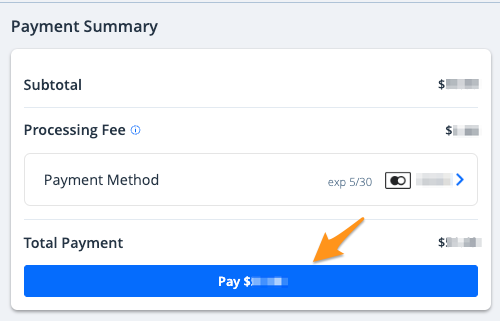
Note:If you have a stored payment method, it will automatically appear here. If you have not added a payment method before or are proceeding as a guest, select Choose Payment Methodto add a credit/debit card.
After completing your payment, you will receive an email confirmation. If you are signed in to a myNCDPS account, a receipt will also be stored in your profile (see Find my Receipt on myNCDPS).